Search This Blog

Showing posts with label HTML. Show all posts

Friday, April 13, 2018

Free HTML Tools

Collection of helpful utilities


AXCEL216's MAX Speeed WinDOwS Tricks + Secrets:

HTML Authoring
Webmaster Resources

GIF + JPEG Shrinkers
Do you have large GIFs/JPEGs cluttering your internet/server space? Are your web pages loading too slow?
HTML Validators
These HTML/CSS/DHTML/XHTML validators check the accuracy of your code, reporting all aspects of design and eventual errors, flaws, invalid links etc
HTML Editors
Offline HTML + text editors
[D]HTML, XML, CSS + Java[Script] Resources
Java No Java... JavaScript dedicated web sites
FTP Transfer Tools
FTP transfer clients + FTP server tools


See all Topics

Thursday, February 22, 2018

Page Break CSS

Before or after


You can put a break on a web page like you can in a document.
A Cascading Style Sheet makes it simple

"The stub-ends left when paragraphs end on the first line of a page are called widows. They have a past but not a future, and they look foreshortened and forlorn."

Orphans are parts of a paragraph that begin on the previous page. An orphan has a future, but no past.

The only paging properties supported by Internet Explorer 7, Safari 3 and Firefox 2 are page-break-before and page-break-after.
The page-break-before and page-break-after properties enable you to say that a page break should occur before or after the specified element. The following example starts a new page every time an h1 heading is encountered and after every .section block.
h1 {
page-break-before:always }
.section {
page-break-after:always}


Etiquette of Pagination


See all Topics

Saturday, January 27, 2018

HTML Preview

HTML Tester

There you are, out in the wilderness of PCdom without a copy of FrontPage (Expression) around. How do you find out what HTML tags looks like?
(fire up notepad, save the file, open with a browser)

HTML Preview
Preview HTML in a new window by entering it into the form. This script allows you to pass anything to a new window.

Instructions help you create a preview on your own web page.

Such as:
HTML TEST BED


See all Topics

Friday, January 05, 2018

MHTML

One file web pages


When a web page is created using HTML, the coding is normally contained in one file and the graphics in separate folders.

The Mime HTML or MHT/MHTML format changed that.

Starting with Office 2000 as an add-in and carried through XP as a "Web Archive" option, the format emerged in Office 2003 as a "Single file web page" selection in the File Save As dialog box.

Here are the Save As choices available in an application such as Word:
  • Web Page, Complete means that the contents of the page (including any pictures) will be saved into a folder as separate files, similar to those on the server hosting the site.

  • Web Page, HTML only means that only the HTML information will be saved. This option and Web Page, Complete will enable you to open the file for viewing in Internet Explorer (or any other browser) at a later time, even when you are offline.

  • Web Archive means that the page will be saved, along with any images it contains, as a single file. You can view a Web Archive later without being connected to the Internet.

  • Text File means that only the text on the page will be saved, not the HTML (or any other) formatting, including graphics.
MIME Encapsulation of Aggregate HTML Documents (MHTML)  

Short Summary of the MHTML Standard


See all Topics

Tuesday, December 26, 2017

New Window

Pick your target


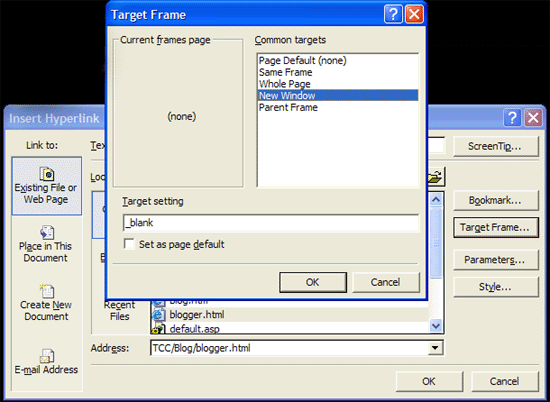
Expression Web/FrontPage/HTML provides the opportunity to choose how a page opens when you click on a hyperlink.

Create a hyperlink as you usually would by selecting the text (or graphic) you want to use for the link.

Choose Insert > Hyperlink...
(or use Ctrl-K or the toolbar icon Link icon as a shortcut),
and locate the page in the current web or enter an address in the URL field.

On the right side of the Create Hyperlink window you'll see a button named "Target frame"; click the button.

You'll get the Target Frame dialog box.

In the "Common targets" field, select New Window.

Click OK, then click OK to close the Create Hyperlink dialog box.

Your hyperlink will now open a new browser window when clicked.

Target page

The code would appear like this:
<a target="_blank" href="TCC/Blog/blogger.html">Blog</a>

To make it the page default, place the following code in the "head" section:
<base target="_blank">


See all Topics

Thursday, December 14, 2017

Learn HTML

More tutorials


I like to read more than one author on a subject. It helps to clarify the sticky parts and each writer has a little bit different perspective on the subject.

WebReference.com has a good collection of material related to the Web and the Internet in general.

Stephanos Piperoglou has written a number of tutorials on Web design and construction.
From HTML 101 to I Shot the Serif and The Seven Habits of Effective Web Sites .

About HTML with Style


W3 Schools

Also:
HTML Tutorials


See all Topics

Friday, November 17, 2017

W3C Validation

Standards


Web pages are written in a language called Hyper Text Markup Language; HTML
The latest version of HTML is 4.01.

There is a move to upgrade the code to Extensible Hyper Text Markup Language.

XHTML is compatible with XML (EXtensible Markup Language) allowing applications to more easily exchange data.

In preparation for making the change, edit your web pages so that element and attribute names are in lower case. XHTML is case-sensitive.

Use <p> rather than <P>.

Also end tags are required. Make sure that <p> is followed by </p>.

<br> should be written <br /> and <hr> as <hr />.

For more information see:

The W3C validation site


See all Topics

Saturday, November 11, 2017

New Line

Shift Enter


When you hit the Enter key, the FrontPage/Expression Web editor inserts an HTML <p> (paragraph) tag. This appears as a double line space in a Web browser.

To insert a single line space (or line break) via an HTML <br> tag, just hold down the Shift key and hit Enter.

This happens when you use the

Enter key

Here's what happens with
Shift +Enter

You could also use Insert>Break... Normal Line Break, but that takes too long.

By the way, if you want your code to be XHTML compliant, use lower case for the elements and pair every <p> with a closing </p>

Differences with HTML

Single elements can be used with a built in closer such as:
<hr /> or <br />


See all Topics

Monday, October 30, 2017

Define URL Parts

More than dot com


Google engineer and blogger Matt Cutts has defined the pieces that make up a Uniform Resource Locator.

At least as Google refers to them when they're sitting around in their backrooms
Domain

Dynamic URL
Fragment or a Named anchor


The Googlers I've talked to are split right down the middle on which way to refer it. Disputes on what to call it can be settled with arm wrestling, dance-offs, or drinking contests. Typically the fragment is used to refer to an internal section within a web document. In this case, the named anchor means "skip to 2 minutes and 30 seconds into the video."


Host


Parameters


Path


Port


Protocol


Second-level domain


Static url


Subdomain


Top-level domain


Parts of a URL


See all Topics

Friday, October 20, 2017

CSS

Cascading Style Sheets


As a web page is formatted in Expression Web/FrontPage, the style choices are applied to each element.
To format the body of the page, the HTML code might be:

<body background="blue" color="white" font-family="times, serif" font-size=10pt>

Every page on the site would need to be coded this way in order to have a consistent look.
Cascading Style Sheets will simplify the problem. On an external page the elements can be defined like this:

body {
background: blue;
color: white;
font-family: times, serif;
font-size: 10pt


Each page would contain a reference to the CSS definitions:

<head>
<link rel="stylesheet" type="text/css" href="mystyle.css">
</head>


When the element "body" is used it will now use the CSS references.

For more information see:

Using Cascading Style Sheets on Your Web Site - David Berry
and
Eric Meyer's Site

In this Blog:
CSS Links
and:
More Cascading Style Sheet Help


See all Topics

Tuesday, March 14, 2017

Bullets and HTML

Some code


Bullets aren’t too difficult to create using HTML.

<ul>

<li>Apples</li>

<li>Pears</li>

<li>Bananas</li>

<li>Grapes</li>

</ul>

Here’s an article that goes into more detail:


Cryer.co.uk


See all Topics

Monday, March 06, 2017

Low Down Footer

CSS code


How to create a CSS footer that remains at the bottom of the page, regardless of content.

CSSStickyFooter.com


See all Topics

Sunday, July 17, 2016

Cheap Certification

Bargain deal


Becoming certified can be expensive and time consuming.
Here's a way to be certified as an HTML Developer, or ASP Developer.

  • Study and train for your certificates at no cost
  • Study and train for your certificates when it is convenient
  • Study and train for your certificates from your own computer
  • Complete your studies in a few weeks
  • Take your exams over the Internet
W3 Schools

Even if you don't take the test, the tutorials are free!


See all Topics

Tuesday, May 31, 2016

Relative Font Sizes

What size are your relatives?


Relative font sizes make websites more accessible and easier to read - but they're not much help unless the person using the site can find a way to actually change text size.

Here's a simple solution for text resizing:

Power To The People: Relative Font Sizes
Article by Bojan Mihelac

Original link from Lockergnome


See all Topics

Sunday, May 22, 2016

HTML Tutorials

How to HTML


Expression Web/FrontPage can quickly create good looking web sites. If you want more versatility and the ability to edit the underlying HTML (Hyper Text Markup Language ), look at these sites:

HTML Code Tutorial (NCSA )

And others:

FrontPage Solutions


See all Topics

Saturday, April 16, 2016

Automated Newsletter

ASP and HTML


Pre-RSS, the predominate method of communication for members of a like minded group was through an emailed newsletter.

Word actually works fine with mail merge to email, but if you want to combine the data gathering and the distribution in a neat package, take a look at this tutorial.
Step 1 : Create a simple HTML Form where users can insert their email addresses and an ASP page which will receive the Form email address from the HTML page and insert it into the database.

Step 2 : Create a simple Access database to store user's email addresses.

Step 3 : A simple admin ASP page from where you can send email messages to all the users whose email addresses are present in the database.

Step 4 : An ASP page from where the users can delete their email addresses from the database if they later choose to.

Scripts20.com:
An ASP Tutorial to create your own News Letter


See all Topics

Thursday, March 31, 2016

CSS, PHP, and all that jazz

Collections of suggestions


Under the belief that more information leads to more understanding, here is a site that may help you round the corners of web design and function. Besides CSS templates there are PHP code nibblets.
In 2003 artypapers was created by R. Marie Cox as a springboard for ideas and a working space of technical implementation -- a place to test and build an extendable collection of core classes (alliteration!) that acts as an application framework for a diverse set of projects and applications.

artypapers.com

Also:
Links and Discussion About the Best CSS Resources Available on the Web.
CSS Help Pile


See all Topics

Monday, March 21, 2016

Scripts you can use

DHTML, Javascripts, PHP


Dynamic Drive provides original DHTML & Javascripts to enhance your web site.

There is an extensive collection as evidenced by this TOC.


  • Calendars

  • Date & Time

  • Document Effects

  • Dynamic Content

  • Form Effects

  • Games

  • Image Effects

  • Links & Tooltips

  • Menus & Navigation

  • Mouse and Cursor

  • Scrollers

  • Text Animations

  • User/System Preference

  • Window and Frames
From

DynamicDrive.com


See all Topics

Thursday, December 10, 2015

Form Design

Fancy functionals


Here is a discussion about how to design a form for use on the web.

"Computers are supposed to make our lives easier, not more difficult. As usability-conscious designers, we can make our users' lives easier by thinking about the way people interact with our websites, providing clear direction, and then putting the burden of sorting out the details in the hands of the computers—not the users.

It's that last part that we're going to focus on here. We've all heard and read about big usability mistakes time and time again: "Don't use images or flash for navigation," "Don't use Javascript for links," and I certainly hope we're all applying those lessons in our work. It's often the smallest usability quirks, however, that create the biggest annoyances for users, especially when it comes to HTML forms. Follow these guidelines, and you'll be off to a good start."

  • Use the right field for the task
  • Give them room to type
  • Shorten your forms and question "mandatory" fields
  • Mark mandatory fields clearly
  • Provide descriptive labels for all of your fields
  • Let the computer, not the user, handle information formatting
  • Use informative error messages
  • Don't return users to an altered form
Sensible Forms
Brian Crescimanno


See all Topics

Monday, October 26, 2015

Send the Viewer on Their Way

Move on


If you have an old site that people still address, or a web page that has been moved, see this code and the explanations.

<html>

<head>
<meta http-equiv="REFRESH" content="3; URL=http://WWW.MiniByteTech.com">
</head>

<body bgcolor="#FFFFFF" text="#000000">


The operative line is:

<meta http-equiv="REFRESH" content="3; URL=http://WWW.MiniByteTech.com">


The value of content is in seconds.
The new location for this web site is WWW.MiniByteTech.com! You will automatically be redirected in 3 seconds. If your browser doesn't automatically load, click <a href="http://WWW.MiniByteTech.com">HERE</a>.

</body>
</html

PCMag.com:
Routing Your Web Site Visitors

Help2Go.com:
Redirecting a Web page

ISiteBuild.com:
How to Redirect a Web Page Using a 301 Redirect

This tools help you determine if the redirect you have created is Search Engine Friendly:

WebConfs.com:
Redirect Checker


See all Topics