Search This Blog

Showing posts with label Tutorials. Show all posts

Wednesday, April 25, 2018

Organizing Your Favorites

Order in chaos


Basic stuff that bares repeating.
(IE7 is not that much different)

Microsoft:
Use Favorites to Get Around the Web


History and Favorites
  • Add a Web Page to Your Favorites
  • Go to a Web Page on Your Favorites List
  • Alphabetize Your Favorites
  • Remove a Web Page from the Favorites List
  • Organize Your Favorite Web Pages in a New Folder
  • Remove a Web Page from a Folder in the Favorites List


See all Topics

Friday, April 13, 2018

Free HTML Tools

Collection of helpful utilities


AXCEL216's MAX Speeed WinDOwS Tricks + Secrets:

HTML Authoring
Webmaster Resources

GIF + JPEG Shrinkers
Do you have large GIFs/JPEGs cluttering your internet/server space? Are your web pages loading too slow?
HTML Validators
These HTML/CSS/DHTML/XHTML validators check the accuracy of your code, reporting all aspects of design and eventual errors, flaws, invalid links etc
HTML Editors
Offline HTML + text editors
[D]HTML, XML, CSS + Java[Script] Resources
Java No Java... JavaScript dedicated web sites
FTP Transfer Tools
FTP transfer clients + FTP server tools


See all Topics

Saturday, April 07, 2018

Crime on the Web

What does it look like?


PC World has an article on e-mail cyber crime, with examples of the notes.

Cyber Crime

FBI and Cyber Crime

Wells Fargo Example


See all Topics

Friday, April 06, 2018

DNS FAQ

Domain Name System


Here's a concise collection of answers about the inner workings of the internet.

For instance:

What is DNS (Domain Name System)?
Websites have both a "friendly" address, called a Uniform Resource Locator (URL) and an IP address. People use URLs to find websites, but computers use IP addresses to find websites. DNS translates URLs into IP addresses (and vice versa). For example, if you type http://www.microsoft.com into the address bar in your web browser, your computer sends a request to a DNS server. The DNS server translates the URL into an IP address so that your computer can find the Microsoft web server.


DNS FAQ


See all Topics

Tuesday, April 03, 2018

Site Maps

Point the way

"As a Web designer and HTML builder, one of the first places I visit on a Web site is the site map. The site map shows an entire overview of the structure of the site, and more importantly, indicates how much effort was put into usability testing during the site's construction."

Learn how to chart a better site map
By Jim Kukral -Builder.com

According to Jakob Nielsen's
Alertbox Usability Study on Site Maps

"27 percent of users turn to site maps when asked to learn about a site's structure. If your site map is poorly designed, you may lose 27 percent of your Web visitors. That could translate into millions of dollars of missed sales for an e-commerce site, or a massive amount of missed leads for a service company."


(A Site Map is a guide to a web site used by visitors. A Sitemap is a file used by search engines to index entries on a site. )


See all Topics

Monday, March 19, 2018

Calculators on the Web

Figure the vigorish


It's sometimes easier to use a preset calculator than it is to write your own in Excel.
Here's a collection of sites:

  • Auto Calculators

  • Bond Calculators

  • Budget Calculators

  • College Calculators

  • Credit Card Calculators

  • Home Calculators

  • Insurance - Disability Calculators

  • Insurance - Health Calculators

  • Insurance - Life Calculators

  • Life Expectancy Calculators

  • Choose-to-Save - Life Expectancy

  • Mutual Fund Calculators

  • Paycheck Planning Calculators

  • Retiree Health

  • Retirement Calculators

  • Roth IRA Calculators

  • Savings Calculators

  • Social Security Calculators

  • Social Security Administration - Estimate Your Potential Benefit

  • Stock Calculators

  • Tax Calculators
Calculators


See all Topics

Wednesday, February 28, 2018

Web Accesability

Make it easy


"Accessibility, the design of HTML documents for accessibility by people with disabilities, is such an important aspect of the Internet today that the Worldwide Web Consortium (W3C) has adopted a set of guidelines for designing accessible Web sites. The Web Content Accessibility Guidelines (WCAG) closely follow Section 508 of the U.S. Rehabilitation Act.

For some Web sites, adherence to the WCAG is not optional; it is a necessity. Expression Web/FrontPage 2003 has tools for evaluating the accessibility of an entire Web site, identifying elements that violate the guidelines, and finding ways to correct the violations. The accessibility checker provides all of this functionality in a single dialog box.

To access the accessibility checker on the Tools menu click Accessibility (Accessibility Reports).

You can use the accessibility checker to check a single page or an entire Web site. The accessibility checker checks for varying levels of accessibility and specifically for adherence to Section 508 of the U.S. Rehabilitation Act. You can check for errors or warnings, and you can add a manual checklist."

Expression Web Accessibility

MSDN:
Adding Rules to the Accessibility checker


Making Your Web Site Accessible to the Blind
Test your site:
Cynthia Says


See all Topics

Thursday, February 22, 2018

Page Break CSS

Before or after


You can put a break on a web page like you can in a document.
A Cascading Style Sheet makes it simple

"The stub-ends left when paragraphs end on the first line of a page are called widows. They have a past but not a future, and they look foreshortened and forlorn."

Orphans are parts of a paragraph that begin on the previous page. An orphan has a future, but no past.

The only paging properties supported by Internet Explorer 7, Safari 3 and Firefox 2 are page-break-before and page-break-after.
The page-break-before and page-break-after properties enable you to say that a page break should occur before or after the specified element. The following example starts a new page every time an h1 heading is encountered and after every .section block.
h1 {
page-break-before:always }
.section {
page-break-after:always}


Etiquette of Pagination


See all Topics

Saturday, February 17, 2018

Font Lister

A look see


I haven't seen, lately, how many fonts you can have on a machine, but I know it's a lot more than earlier versions.

Here is a free download that will create an HTML file that will show all the fonts installed on your computer.

"Using FontList, you can change the predefined sample text, exclude seldom used fonts from the list and change the path for the HTML file.

In your browser, you can change the style of a font and zoom in on a font. You can also view the character map of a font. And, for some, maybe the most important feature, you can create a print out of all your fonts.


FontList


See all Topics

Saturday, January 27, 2018

HTML Preview

HTML Tester

There you are, out in the wilderness of PCdom without a copy of FrontPage (Expression) around. How do you find out what HTML tags looks like?
(fire up notepad, save the file, open with a browser)

HTML Preview
Preview HTML in a new window by entering it into the form. This script allows you to pass anything to a new window.

Instructions help you create a preview on your own web page.

Such as:
HTML TEST BED


See all Topics

Friday, January 12, 2018

IE Temp Files

Storage area


Every once in awhile when the Berners-Lee pipeline clogs up, you are instructed to delete the temporary files that IE saves.

You can do it with the Click of an IE Options button.

Here's where those files are stored:


As you see, you could move that location if you wanted to.

Finding the Temporary Internet Files folder


See all Topics

Tuesday, December 26, 2017

New Window

Pick your target


Expression Web/FrontPage/HTML provides the opportunity to choose how a page opens when you click on a hyperlink.

Create a hyperlink as you usually would by selecting the text (or graphic) you want to use for the link.

Choose Insert > Hyperlink...
(or use Ctrl-K or the toolbar icon Link icon as a shortcut),
and locate the page in the current web or enter an address in the URL field.

On the right side of the Create Hyperlink window you'll see a button named "Target frame"; click the button.

You'll get the Target Frame dialog box.

In the "Common targets" field, select New Window.

Click OK, then click OK to close the Create Hyperlink dialog box.

Your hyperlink will now open a new browser window when clicked.
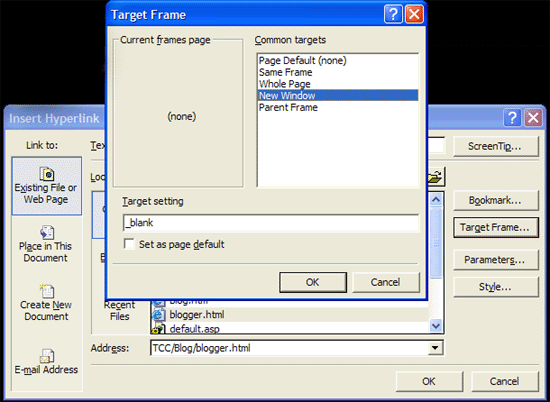
Target page

The code would appear like this:
<a target="_blank" href="TCC/Blog/blogger.html">Blog</a>

To make it the page default, place the following code in the "head" section:
<base target="_blank">


See all Topics

Thursday, December 14, 2017

Learn HTML

More tutorials


I like to read more than one author on a subject. It helps to clarify the sticky parts and each writer has a little bit different perspective on the subject.

WebReference.com has a good collection of material related to the Web and the Internet in general.

Stephanos Piperoglou has written a number of tutorials on Web design and construction.
From HTML 101 to I Shot the Serif and The Seven Habits of Effective Web Sites .

About HTML with Style


W3 Schools

Also:
HTML Tutorials


See all Topics

Sunday, December 10, 2017

Type, What It Looks Like

Screen fonts preview


This is a tool that lets you see how different typefaces will look on the screen. It also allows you to compare three fonts at once.
"The Typetester is an online application for comparison of the fonts for the screen. Its' primary role is to make web designer's life easier. As the new fonts are bundled into operating systems, the list of the common fonts will be updated."
TypeTester


See all Topics

Friday, November 17, 2017

W3C Validation

Standards


Web pages are written in a language called Hyper Text Markup Language; HTML
The latest version of HTML is 4.01.

There is a move to upgrade the code to Extensible Hyper Text Markup Language.

XHTML is compatible with XML (EXtensible Markup Language) allowing applications to more easily exchange data.

In preparation for making the change, edit your web pages so that element and attribute names are in lower case. XHTML is case-sensitive.

Use <p> rather than <P>.

Also end tags are required. Make sure that <p> is followed by </p>.

<br> should be written <br /> and <hr> as <hr />.

For more information see:

The W3C validation site


See all Topics

Saturday, November 11, 2017

New Line

Shift Enter


When you hit the Enter key, the FrontPage/Expression Web editor inserts an HTML <p> (paragraph) tag. This appears as a double line space in a Web browser.

To insert a single line space (or line break) via an HTML <br> tag, just hold down the Shift key and hit Enter.

This happens when you use the

Enter key

Here's what happens with
Shift +Enter

You could also use Insert>Break... Normal Line Break, but that takes too long.

By the way, if you want your code to be XHTML compliant, use lower case for the elements and pair every <p> with a closing </p>

Differences with HTML

Single elements can be used with a built in closer such as:
<hr /> or <br />


See all Topics

Monday, November 06, 2017

VVe have a few Phakes

VVorrisome URLs


If there weren't enough things to look out for, Paul Ferguson warns us of the use of a double "V" in web addresses:

VVINDOWS.COM NS NS1.MYDOMAIN.COM
VVINDOWS.COM NS NS2.MYDOMAIN.COM
VVINDOWS.COM NS NS3.MYDOMAIN.COM
VVINDOWSVISTA.COM NS DNS1.MALKM.COM
VVINDOWSVISTA.COM NS DNS2.MALKM.COM

Here are a few of the domains that have been registered:

VVindows


See all Topics

Monday, October 30, 2017

Define URL Parts

More than dot com


Google engineer and blogger Matt Cutts has defined the pieces that make up a Uniform Resource Locator.

At least as Google refers to them when they're sitting around in their backrooms
Domain

Dynamic URL
Fragment or a Named anchor


The Googlers I've talked to are split right down the middle on which way to refer it. Disputes on what to call it can be settled with arm wrestling, dance-offs, or drinking contests. Typically the fragment is used to refer to an internal section within a web document. In this case, the named anchor means "skip to 2 minutes and 30 seconds into the video."


Host


Parameters


Path


Port


Protocol


Second-level domain


Static url


Subdomain


Top-level domain


Parts of a URL


See all Topics

Friday, October 20, 2017

CSS

Cascading Style Sheets


As a web page is formatted in Expression Web/FrontPage, the style choices are applied to each element.
To format the body of the page, the HTML code might be:

<body background="blue" color="white" font-family="times, serif" font-size=10pt>

Every page on the site would need to be coded this way in order to have a consistent look.
Cascading Style Sheets will simplify the problem. On an external page the elements can be defined like this:

body {
background: blue;
color: white;
font-family: times, serif;
font-size: 10pt


Each page would contain a reference to the CSS definitions:

<head>
<link rel="stylesheet" type="text/css" href="mystyle.css">
</head>


When the element "body" is used it will now use the CSS references.

For more information see:

Using Cascading Style Sheets on Your Web Site - David Berry
and
Eric Meyer's Site

In this Blog:
CSS Links
and:
More Cascading Style Sheet Help


See all Topics

Monday, October 16, 2017

Synch Time

Time Server


Things I've forgotten or never knew.

  1. Double click on the date and time on the taskbar to open the time applet.

  2. Click on the Internet Time tab.

  3. Choose a time server, and click on the Update Now button.

As long as you are connected to the internet, Windows will attempt to synchronize the time once per week.
You can type the name of a time server if you want to use one that is not listed. Only time servers that use the Simple Network Time Protocol (SNTP) will work. Inserting an Internet address that uses the Hypertext Transfer Protocol (HTTP) will not work. The time server time.windows.com is operated by Microsoft. The time server time.nist.gov is operated by the U.S. government. Other time servers provided by your computer's manufacturer might also be listed.


Also:
Time Flies Like an Arrow


See all Topics